Concept
All four transformation utilities (BotaTfWrench, BotaTfTwist, BotaTfImu, BotaTfPose) follow an identical usage pattern. Each is implemented as a self-contained C++ class (with a matching Python binding) that you configure once and then call in your real-time loop.
FT Stack Compatibility
Designed to be easily used in combination with other components.
JSON-Based Configuration
Configuration is handled through a JSON file passed to the class constructor.
Defining the Transformation Tree
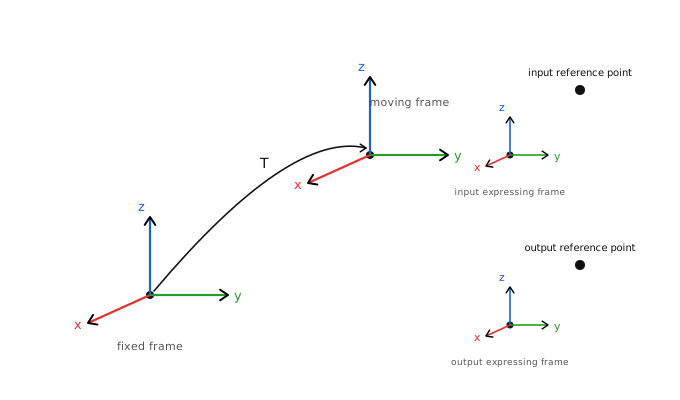
For a transformation to be computed, the geometry of the problem must be fully described, i.e. defining the reference point and expression axes for both input and output.
Note
All four entries must be set before calling update(). They can be provided via code
setters, loaded from a JSON configuration file, or supplied through a combination of both.
In general, the four entries (input/output reference points and expressing frames) can be defined freely with respect to any fixed common frame.
In practice however, since signals typically appear at the robot’s end-effector, it is convenient to introduce a moving frame attached to it. By expressing all four entries relative to this moving frame, only a single transformation needs to be maintained at runtime — the one from the fixed frame to the moving frame — which updates as the robot moves.
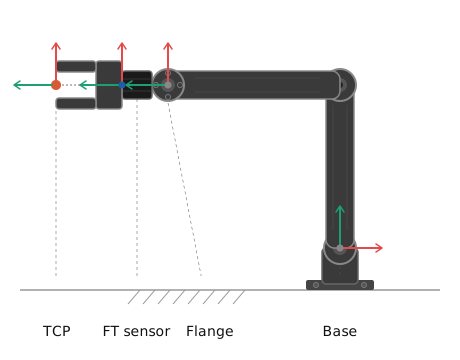
Leveraging the idea of the “moving frame” and assigning this to the flange of the robot (point for which a TF from the base frame is usually available) the most common use cases can be easily described. For example:
Signal type |
Ref. point origin |
Ref. point translation |
Exp. axes origin |
Exp. axes rotation |
|---|---|---|---|---|
Sensor frame as reference, expressed in sensor frame |
moving_frame |
[0, 0, λ] |
moving_frame |
[0.71, 0, 0, -0.71] |
TCP frame as reference, expressed in base frame |
moving_frame |
[0, 0, φ] |
fixed_frame |
[1, 0, 0, 0] |
Flange frame as reference, expressed in base frame |
moving_frame |
[0, 0, 0] |
fixed_frame |
[1, 0, 0, 0] |
Configuration Files
Static TF entries can be loaded from a JSON file instead of (or in addition to) code. This separates hardware-specific geometry from application logic and makes it easy to reconfigure without recompiling.
Important
A setter called in code will return false and print a warning if the same entry was
already loaded from the JSON file. This prevents silent conflicts between file-based and
code-based configuration.
Each class reads a dedicated top-level key: "tf_wrench_config", "tf_twist_config",
"tf_imu_config", or "tf_pose_config". As sub-level objects the following
keys must be defined:
TF Configuration JSON File Structure
Basic configuration
name
string
Human-readable label for the block, accessible via name().
policy
string
Runtime error policy. Accepted values: "best_effort" (default),
"soft_rt", "hard_rt", "strict_rt".
Input Reference Point
set_input_reference_point
object (optional)
It must have the following fields:
origin
string
"fixed_frame" or "moving_frame".
translation
double[3]
[x, y, z] in metres from origin frame to input reference point.
Input Expression Axes
set_input_expression_axes
object (optional)
It must have the following fields:
origin
string
"fixed_frame" or "moving_frame".
rotation
double[4]
[qw, qx, qy, qz] unit quaternion rotation from origin frame to input expression axes
Output Reference Point
set_output_reference_point
object (optional)
It must have the following fields:
origin
string
"fixed_frame" or "moving_frame".
translation
double[3]
[x, y, z] in metres from origin frame to output reference point
Output Expression Axes
set_output_expression_axes
object (optional)
It must have the following fields:
origin
string
"fixed_frame" or "moving_frame".
rotation
double[4]
[qw, qx, qy, qz] unit quaternion rotation from origin frame to output expression axes
JSON File Templates
Templates for JSON configuration files are included in the examples provided with our SDKs.